My
previous article has demonstrate how to build to ffmpeg libraries in windows. In here, I continue the work, to use the built libraries for decoding a raw h264 file.
I use ffmpeg
version 2.4.12 in here.
零.
Provision a raw h264 file
To make a raw h264 video, the zeroth step, is to own a h264 video with container.
This is a website you could download 720p game videos.
for me, I use
World of Warcraft: Warlords of Draenor Cinematic.
This video is h264 format indeed.
After video has been download, move the mp4 file to the folder containing ffmpeg executable binary, and type the command line:
Gaiger@i5-4570 ~/ffmpeg/2.4.12/built/bin
$ ./ffmpeg.exe -i World\ of\ Warcraft_Warlords_of_Draenor_Cinematic_Trailer.mp4
 -vcodec copy -bsf h264_mp4toannexb -an -f h264 wow6.h264
The bold font words be the input/output file name, you could change them.
After the converting done woth
ou any error, you could use ffplay (which I do not build in previous article, but you could download it from
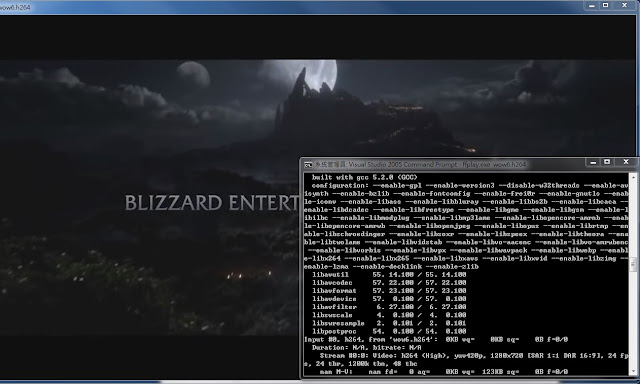
here) to verify if the raw 264 file works or not.
Of course, if you would like to use others video as test video ( like porn video for excited :-X), it works always.
一.
Prepare dependent libraries and headers.
Create a Visual Studio new project name ffmpegh264decode , and Visual studio would create this folder automatically.
Copy the built ffmpeg libraries with header which has been built from previous article.
Copy the raw h264 file to it.
Copy
YourMinGWPath\msys\1.0\lib\libmingwex.a file to this folder.
Copy
YourMinGWPath\msys\1.0\lib\libiconv.a file to this folder.
Copy
YourMinGWPath\msys\1.0\lib\libz.a file to it.
Copy
YourMinGWPath\msys\1.0\lib\gcc\
YourMinGWBitNumber\
GCCVersion\libgcc.a to this folder
Download the
inttypes.h file from here and put it in this folder.
Download the stdint.h file from here and put it in this folder.
Download the
win32thread.h and
win32thread.c and put them in this folder.
The main.c be empty main function currently.
二.
Set path and libraries in Visual Studio project.
Add include path build/include and . in VS project:
Add library path build/lib and . in VS :
Add dependency libraries,
libavcodec.a libavutil.a libavformat.a libavdevice.a libswscale.a
libswresample.a
libgcc.a libmingwex.a libz.a
libiconv.a in VS:
(the bold ones are not necessary/included in older ffmpeg version.)
Add win32thread.c in the compilation source list:
三.
My code:
/*
 ffmpeg api change log:

 https://github.com/FFmpeg/FFmpeg/blob/master/doc/APIchanges#L699

*/

#include <stdio.h>
#include <stdlib.h>
#include <string.h>

#if defined(_MSC_VER) && !defined(__cplusplus)
#pragma warning( error : 4013 )
#define inline
#endif

#ifdef __cplusplus
extern "C"{
#endif

#define __STDC_CONSTANT_MACROS
#ifdef _STDINT_H
#undef _STDINT_H
#endif

#include "stdint.h"

#include "libavcodec/avcodec.h"
#include "libswscale/swscale.h"

#ifdef _WIN32
 #include "win32thread.h"
#else
 #include <pthread.h>
#endif

#ifdef __cplusplus
}
#endif

static int LockManagerCallback(void **ppMutex, enum AVLockOp op)
{
 switch(op)
 {
 case AV_LOCK_CREATE:
  *ppMutex = (pthread_mutex_t *)av_malloc(sizeof(pthread_mutex_t));
  pthread_mutex_init((pthread_mutex_t *)(*ppMutex), NULL);
 break;

 case AV_LOCK_OBTAIN:
  pthread_mutex_lock((pthread_mutex_t *)(*ppMutex));
 break;

 case AV_LOCK_RELEASE:
  pthread_mutex_unlock((pthread_mutex_t *)(*ppMutex));
 break;

 case AV_LOCK_DESTROY:
  pthread_mutex_destroy((pthread_mutex_t *)(*ppMutex));
  av_free(*ppMutex);
 break;
 }/*switch*/

 return 0;
}/*LockManagerCallback*/


void InitOnceMeterials(void)
{
#ifdef _WIN32
 win32_threading_init();
#endif

#if LIBAVCODEC_VERSION_INT < AV_VERSION_INT(54, 0, 100)
 /* must be called before using avcodec lib */
 avcodec_init();
#endif

 /* register all the codecs */
    avcodec_register_all();

 av_lockmgr_register(LockManagerCallback);

 return;
}/*InitOnceMeterials*/


typedef struct
{
 pthread_mutex_t mutex;

 AVCodec *pCodec;
 AVCodecParserContext *pParserCtx;
 AVCodecContext *pCtx;
 AVPacket pkt;
 AVFrame *pFrameYUV, *pFrameRGB;
 struct SwsContext *pSwsCtx;
 unsigned char *pOutputBuffer;

}FFMPEGDecoder;


int CloseFFmpegH264Decoder(void *pDecoder)
{
 FFMPEGDecoder *pFFMPEGDecoder;

 if(NULL == pDecoder)
  return 1;

 pFFMPEGDecoder = (FFMPEGDecoder*)pDecoder;

 pFFMPEGDecoder->pOutputBuffer = NULL;

 if(NULL != pFFMPEGDecoder->pCtx)
 {
  if(NULL != pFFMPEGDecoder->pCtx->codec)
   avcodec_close(pFFMPEGDecoder->pCtx);

#if LIBAVCODEC_VERSION_INT < AV_VERSION_INT(55,22, 0)
  av_free(pFFMPEGDecoder->pCtx);
#else
  avcodec_free_context(&pFFMPEGDecoder->pCtx);
#endif
  pFFMPEGDecoder->pCtx = NULL;
 }/*if NULL != c*/

 if(NULL != pFFMPEGDecoder->pParserCtx)
  av_parser_close(pFFMPEGDecoder->pParserCtx);
 pFFMPEGDecoder->pParserCtx = NULL;

 av_free_packet(&pFFMPEGDecoder->pkt);

 if(NULL != pFFMPEGDecoder->pFrameYUV)
 {
#if LIBAVCODEC_VERSION_INT < AV_VERSION_INT(55,28,1)
  av_free(pFFMPEGDecoder->pFrameYUV);
  pFFMPEGDecoder->pFrameYUV = NULL;
#else
  av_frame_free(&pFFMPEGDecoder->pFrameYUV);
#endif

 }/*if NULL != pFrameYUV*/

 if(NULL != pFFMPEGDecoder->pFrameRGB)
 {
#if LIBAVCODEC_VERSION_INT < AV_VERSION_INT(55,28,1)
  av_free(pFFMPEGDecoder->pFrameRGB);
  pFFMPEGDecoder->pFrameRGB = NULL;
#else
  av_frame_free(&pFFMPEGDecoder->pFrameYUV);
#endif
 }/*if NULL != pFrameRGB*/

 if(NULL != pFFMPEGDecoder->pSwsCtx)
 {
  sws_freeContext(pFFMPEGDecoder->pSwsCtx);
  pFFMPEGDecoder->pSwsCtx = NULL;
 }/*if NULL == ctx*/

 pthread_mutex_destroy(&pFFMPEGDecoder->mutex);

 av_free(pFFMPEGDecoder);
 pFFMPEGDecoder = NULL;

 return 0;
}/*FFMPEG_H264_Decode_Close*/


void *InitFFMpegH264Decoder(void)
{
 FFMPEGDecoder *pDecoder;

 pDecoder = (FFMPEGDecoder*)av_malloc(1*sizeof(FFMPEGDecoder));
 if(NULL == pDecoder)
  return NULL;

 memset(pDecoder, 0, sizeof(FFMPEGDecoder));

 pDecoder->pCodec = avcodec_find_decoder(CODEC_ID_H264);
 pDecoder->pCtx = avcodec_alloc_context3(pDecoder->pCodec);
 pDecoder->pParserCtx = av_parser_init(pDecoder->pCtx->codec_id);

 av_init_packet(&pDecoder->pkt);

 pDecoder->pSwsCtx = NULL;

#if LIBAVCODEC_VERSION_INT < AV_VERSION_INT(55,28,1)
 pDecoder->pFrameRGB = avcodec_alloc_frame();
 pDecoder->pFrameYUV = avcodec_alloc_frame();
#else
 pDecoder->pFrameRGB = av_frame_alloc();
 pDecoder->pFrameYUV = av_frame_alloc();
#endif
 pDecoder->pOutputBuffer = NULL;

 if(NULL == pDecoder->pCodec || NULL == pDecoder->pCtx
  || NULL == pDecoder->pFrameRGB
  || NULL == pDecoder->pFrameYUV)
 {
  CloseFFmpegH264Decoder(pDecoder);
  return NULL;
 }/*init fail*/


 /* we do not send complete frames */
 if(pDecoder->pCodec->capabilities & CODEC_CAP_TRUNCATED)
  pDecoder->pCtx->flags |= CODEC_FLAG_TRUNCATED;

 if( 0 > avcodec_open2(pDecoder->pCtx, pDecoder->pCodec, NULL))
 {
  CloseFFmpegH264Decoder(pDecoder);
  return NULL;
 }/*if 0 > sts*/


 pthread_mutex_init(&pDecoder->mutex, NULL);

 return (void*)pDecoder;

}/*InitFFMpegDecoder*/


int FFmpegH264Decode(void *pDecoder, unsigned char *pH264,  unsigned int h264Size,
 unsigned char *pRGB, int *pWidth, int *pHeight)
{

 FFMPEGDecoder *pFFMPEGDecoder;
 int consumeSize;
 BOOL gotPicture;
 AVPacket *pPacket;

 if(NULL == pDecoder)
  return -1;

 consumeSize = 0;
 pFFMPEGDecoder =(FFMPEGDecoder*)pDecoder;

 pPacket = &pFFMPEGDecoder->pkt;

 av_parser_parse2(pFFMPEGDecoder->pParserCtx, pFFMPEGDecoder->pCtx,
  &pPacket->data, &pPacket->size, pH264, h264Size,
  pPacket->pts, pPacket->dts, AV_NOPTS_VALUE);

 consumeSize = avcodec_decode_video2(pFFMPEGDecoder->pCtx, pFFMPEGDecoder->pFrameYUV,
  &gotPicture, &pFFMPEGDecoder->pkt);

 if(0 == gotPicture)
  return -2;

 *pWidth = pFFMPEGDecoder->pFrameYUV->width;
 *pHeight = pFFMPEGDecoder->pFrameYUV->height;

 /*only for color converting, it doese not change the image resolution*/
 if(NULL == pFFMPEGDecoder->pSwsCtx)
 {
  sws_freeContext(pFFMPEGDecoder->pSwsCtx);

  pFFMPEGDecoder->pSwsCtx = sws_getContext(
   *pWidth, *pHeight, PIX_FMT_YUV420P,
   *pWidth, *pHeight, PIX_FMT_BGR24,
   SWS_FAST_BILINEAR, NULL, NULL, NULL);
 }/*if NULL ==  pFFMPEGDecoder->pSwsCtx*/


 if(pRGB != pFFMPEGDecoder->pOutputBuffer)
 {
  pFFMPEGDecoder->pOutputBuffer = pRGB;
  avpicture_fill( (AVPicture *)(pFFMPEGDecoder->pFrameRGB),
   (unsigned char*)pRGB, PIX_FMT_BGR24,
   pFFMPEGDecoder->pCtx->width, pFFMPEGDecoder->pCtx->height);
 }/*if pFrameBuffer != pFFMPEGDecoder->pFrameBuffer*/

 sws_scale( pFFMPEGDecoder->pSwsCtx, pFFMPEGDecoder->pFrameYUV->data,
    pFFMPEGDecoder->pFrameYUV->linesize, 0, pFFMPEGDecoder->pCtx->height,
    pFFMPEGDecoder->pFrameRGB->data, pFFMPEGDecoder->pFrameRGB->linesize);

 return consumeSize;
}/*FFmpegH264Decode*/


#if defined(_MSC_VER)
#pragma warning( disable : 4996 )
#endif

#define FOUR       (4)
#define ALIGN_TO_FOUR(VAL)    (((VAL) + FOUR - 1) & ~(FOUR - 1) )

int BMPwriter(unsigned char *pRGB, int bitNum, int width, int height, char *pFileName)
{
 FILE *fp;
 int fileSize;
 unsigned char *pMovRGB;
 int i;
 int widthStep;

 unsigned char header[54] = {
  0x42,        // identity : B
  0x4d,        // identity : M
  0, 0, 0, 0,  // file size
  0, 0,        // reserved1
  0, 0,        // reserved2
  54, 0, 0, 0, // RGB data offset
  40, 0, 0, 0, // struct BITMAPINFOHEADER size
  0, 0, 0, 0,  // bmp width
  0, 0, 0, 0,  // bmp height
  1, 0,        // planes
  24, 0,       // bit per pixel
  0, 0, 0, 0,  // compression
  0, 0, 0, 0,  // data size
  0, 0, 0, 0,  // h resolution
  0, 0, 0, 0,  // v resolution
  0, 0, 0, 0,  // used colors
  0, 0, 0, 0   // important colors
 };

 widthStep = ALIGN_TO_FOUR(width*bitNum/8);

 fileSize = ALIGN_TO_FOUR(widthStep*height) + sizeof(header);

 memcpy(&header[2], &fileSize, sizeof(int));
 memcpy(&header[18], &width, sizeof(int));
 memcpy(&header[22], &height, sizeof(int));
 memcpy(&header[28], &bitNum, sizeof(short));


 printf("written on file %s ...", pFileName);
 fp = fopen(pFileName, "wb");

 fwrite(&header[0], 1, sizeof(header), fp);

 pMovRGB  = pRGB + (height - 1)*widthStep;

 for(i = 0; i < height; i++){
  fwrite(pMovRGB, 1, widthStep, fp);
  pMovRGB -= widthStep;
 }/*for i*/

 fclose(fp);
 printf("done\n");

 return 0;
}/*BMPwriter*/


int main(int agrc, char *argv[])
{
 int h264Size;
 unsigned char *pH264;
 void *pH264Decoder;
 char fileName[256];
 FILE *fp;

 sprintf(&fileName[0], "wow6.h264");

 if(agrc > 1)
  strncpy(&fileName[0], argv[1], 256);

 fp = fopen(&fileName[0],"rb");

 if(NULL == fp)
 {
  printf("file %s is not existed\n", &fileName[0]);
  return -1;
 }/*if NULL == fp*/

 {
  fseek(fp, 0L, SEEK_END);
  h264Size = ftell(fp);
  fseek(fp, 0L, SEEK_SET);
 }/*get file size*/

 if(0 == h264Size)
 {
  printf("file %s is empty\n", &fileName[0]);
  return -2;
 }/*if 0 == h264Size*/

 pH264 = (unsigned char*)malloc(h264Size);
 fread(pH264, 1, h264Size, fp);
 fclose(fp); fp = NULL;


 InitOnceMeterials();

 pH264Decoder = InitFFMpegH264Decoder();

 if(NULL == pH264Decoder)
 {
  printf("initialize decoder error\n");
  return -3;
 }/*if 0 == h264Size*/


 {
  int i;
  int remainSize, consumeRize;
  int width, height;
  unsigned char *pRGB, *pMovH264;

  pRGB = (unsigned char*)malloc(8192 * 4320 * 4); /*8k resolution , RGBA*/
  pMovH264 = pH264;

  remainSize = h264Size;

  i = 0;
  while(0 < remainSize )
  {
   consumeRize = FFmpegH264Decode(pH264Decoder, pMovH264, remainSize,
    pRGB, &width, &height);

   if(0 > consumeRize)
    break;
   //printf("frame size = %d Bytes\n", consumeRize);
   remainSize -= consumeRize;
   pMovH264 += consumeRize;

   if(0 == i%300)
   {
    char fileOutName[128];
    sprintf(&fileOutName[0], "%d.bmp", i);
    BMPwriter(pRGB, 24, width, height,  &fileOutName[0]);
   }/*save bmp*/

   i++;
  }/*while */

  free(pRGB); pRGB = NULL;
 }/*local variable*/

 CloseFFmpegH264Decoder(pH264Decoder);
 pH264Decoder = NULL;
 free(pH264); pH264 = NULL;

 return 0;
}/*main*/
四.
After your press the play button on the visual studio, this movie would be decoded and saved BMP files. (My code would save one BMP file per 300 frames.)
600.bmp :

2700.bmp:

Note : my unit test does not demonstrate the multithread decoding, but it support this function, actually. (of cours, you should call InitFFMpegH264Decoder more than once to create multi-docoder handle.)
Reference:
http://stackoverflow.com/questions/10380045/is-there-any-easy-way-to-extract-h-264-raw-stream-in-annexb-format